 by
Cloud computing is a technology that allows users to access computer resources such as storage, software, databases, and servers through the internet instead of using local computers or physical devices. It enables organizations and individuals to store and process data online from anywhere at any time. Cloud computing provides services on demand, reducing the need for expensive hardware and maintenance costs. Businesses use cloud computing for data storage, communication, application development, and backup services. It offers flexibility, scalability, speed, and cost efficiency in business operations. Popular cloud service models include Software as a Service, Platform as a Service, and Infrastructure as a Service. It plays an important role in modern information systems and digital business management.
History of Cloud Computing:
-
Early Development of Computing
The history of cloud computing began in the 1950s and 1960s with the development of large mainframe computers. During this period, many users shared a single computer through terminals because computers were expensive and limited in number. Scientists and researchers introduced the concept of time sharing, which allowed multiple users to access computing resources simultaneously. In the 1960s, computer scientist John McCarthy suggested that computing services could one day be provided like public utilities such as electricity and water. This idea became the foundation of cloud computing. As computer networks and internet technologies improved over time, organizations started developing systems that allowed remote access to data and software, leading to the modern concept of cloud based services and online computing systems.
-
Growth of Internet and Virtualization
The rapid growth of the internet during the 1990s played an important role in the development of cloud computing. Businesses started using the internet for communication, data sharing, and online services. At the same time, virtualization technology became popular. Virtualization allowed one physical server to operate as multiple virtual machines, improving resource utilization and reducing hardware costs. Companies could now store data and run applications on remote servers instead of local computers. In 1999, Salesforce introduced cloud based business applications through the internet, becoming one of the first major cloud service providers. This period marked the transition from traditional computing to internet based computing. Improved network infrastructure and software development further increased the popularity and practicality of cloud computing systems worldwide.
-
Modern Cloud Computing Era
The modern era of cloud computing began in the early 2000s with the launch of large scale cloud platforms and services. In 2006, Amazon introduced Amazon Web Services, providing storage, computing power, and infrastructure services over the internet. Later, companies like Google and Microsoft also launched cloud platforms and online applications. Businesses started adopting cloud computing because it reduced costs, improved flexibility, and allowed easy access to information from anywhere. Cloud computing became widely used for data storage, software services, artificial intelligence, and business management. Today, cloud technology supports online learning, banking, healthcare, e commerce, and communication systems. Continuous advancements in internet speed, cybersecurity, and mobile technology continue to expand the importance and usage of cloud computing globally.
Uses of Cloud Computing in MIS:
-
Data Storage and Management
Cloud computing is widely used in Management Information Systems for storing and managing large amounts of organizational data. Businesses can save files, customer records, financial information, and operational data on cloud servers instead of physical storage devices. This allows managers and employees to access information from anywhere through the internet. Cloud storage reduces the need for expensive hardware and maintenance costs. It also provides automatic backup and recovery facilities, reducing the risk of data loss. In MIS, cloud based data management improves information sharing, accuracy, and speed of decision making. Organizations can easily increase storage capacity according to business requirements. Cloud systems also support real time data updates, helping managers monitor business activities and maintain efficient organizational operations.
- Decision Making Support
Cloud computing supports managerial decision making by providing fast access to accurate and updated information. Management Information Systems use cloud technology to collect, process, and analyze business data from different departments in real time. Managers can access reports, dashboards, and performance indicators through internet connected devices at any location. This helps organizations make quick and informed decisions. Cloud based MIS also supports advanced technologies such as data analytics, artificial intelligence, and forecasting tools for better business analysis. It improves communication and collaboration among managers working in different locations. By using cloud computing, organizations can respond quickly to market changes and customer needs. The availability of centralized information improves planning, coordination, and overall organizational performance in modern business environments.
-
Communication and Collaboration
Cloud computing improves communication and collaboration within organizations through cloud based Management Information Systems. Employees, managers, and departments can share files, reports, and information instantly through online platforms. Cloud applications allow teams to work together on projects from different locations using internet connected devices. This is especially useful for organizations with multiple branches or remote employees. Cloud computing supports video conferencing, online meetings, shared documents, and real time communication systems. MIS becomes more effective because information flows quickly and efficiently between departments. Improved collaboration helps reduce delays, misunderstandings, and duplication of work. It also increases employee productivity and teamwork. By using cloud technology, organizations can coordinate business activities smoothly and improve overall efficiency and organizational communication processes.
-
Cost Reduction and Scalability
Cloud computing helps organizations reduce operational costs in Management Information Systems. Businesses do not need to purchase expensive hardware, software, or large data centers because cloud service providers manage these resources online. Organizations pay only for the services and storage they use, making cloud computing cost effective. It also reduces expenses related to maintenance, system upgrades, and technical support. Another important advantage is scalability. Organizations can easily increase or decrease storage capacity and computing resources according to business requirements. This flexibility is useful for growing businesses and seasonal operations. Cloud based MIS allows companies to adapt quickly to changing business needs without major investments. Cost efficiency and scalability improve organizational performance, resource utilization, and long term business sustainability.
-
Data Backup and Disaster Recovery
Cloud computing provides reliable data backup and disaster recovery facilities in Management Information Systems. Important business data is automatically stored on remote cloud servers, reducing the risk of information loss caused by hardware failure, cyber attacks, natural disasters, or human error. Organizations can quickly recover lost data and continue business operations without major interruption. This improves business continuity and reduces operational risks. Cloud service providers often maintain multiple backup systems and advanced security measures for data protection. Managers can access backup information from different locations whenever needed. In MIS, cloud based backup systems improve reliability, security, and availability of organizational information. Effective disaster recovery systems help organizations protect valuable data and maintain smooth operations during unexpected situations or emergencies.
Components of Cloud Computing:
1. Client Infrastructure
Client infrastructure refers to the front end part of cloud computing that allows users to access cloud services. It includes devices such as computers, laptops, smartphones, tablets, and software applications used to connect to the cloud through the internet. Users interact with cloud systems using web browsers or mobile applications. Client infrastructure provides the interface between users and cloud service providers. It helps employees and managers access files, software, and business applications from any location. A strong client infrastructure improves user experience, communication, and system performance. In Management Information Systems, it supports remote working, online collaboration, and real time access to organizational information. Proper internet connectivity and compatible devices are important for effective functioning of client infrastructure in cloud computing environments.
2. Application
Applications are software programs provided through cloud computing services over the internet. Users can access these applications without installing them on local computers. Cloud applications perform different business functions such as accounting, customer relationship management, data analysis, communication, and project management. Organizations use cloud based applications to improve operational efficiency and reduce software maintenance costs. These applications are managed and updated by cloud service providers, ensuring users always access the latest versions. Cloud applications support collaboration because multiple users can work on the same system simultaneously from different locations. In Management Information Systems, cloud applications help managers access real time business information and improve decision making. Popular examples include online email services, document sharing platforms, and enterprise management systems.
3. Service
Service is a major component of cloud computing that provides computing resources and facilities to users through the internet. Cloud services are generally divided into three main categories: Software as a Service, Platform as a Service, and Infrastructure as a Service. These services allow organizations to use software, development platforms, and computing infrastructure without owning physical resources. Cloud services provide flexibility, scalability, and cost efficiency for businesses. Users can access services on demand according to organizational requirements. Service providers manage maintenance, updates, and technical support, reducing the workload of organizations. In Management Information Systems, cloud services improve data processing, communication, and information management. Efficient cloud services help organizations increase productivity, reduce operational costs, and support modern business activities effectively.
4. Runtime Cloud
Runtime cloud refers to the environment where cloud based applications and services are executed. It includes the software and operating systems required for running applications smoothly on cloud servers. Runtime cloud manages application performance, processing speed, memory allocation, and system operations. It allows applications to function efficiently without depending on local computer systems. Organizations benefit from improved reliability, flexibility, and continuous availability of services. Runtime cloud supports multitasking and enables several applications to operate simultaneously in a cloud environment. In Management Information Systems, it helps managers access business applications and process information quickly from different locations. Proper runtime cloud management improves system stability, performance, and security. It plays an important role in ensuring smooth operation of cloud computing services and business processes.
5. Storage
Storage is an important component of cloud computing used for saving and managing digital data on remote servers. Cloud storage allows organizations to store files, databases, documents, videos, and business information online instead of using local storage devices. Users can access stored data anytime through internet connected devices. Cloud storage provides flexibility because organizations can increase or decrease storage capacity according to their needs. It also supports automatic backup, data recovery, and information sharing. In Management Information Systems, cloud storage improves accessibility, security, and management of organizational data. Cloud service providers use advanced technologies to protect information from loss and unauthorized access. Efficient cloud storage systems help businesses reduce hardware costs and improve operational efficiency in modern digital environments.
6. Infrastructure
Infrastructure is the backbone of cloud computing and includes physical and virtual resources such as servers, networking systems, data centers, and storage devices. These resources support the operation of cloud services and applications. Cloud infrastructure is managed by service providers who maintain hardware, software, security, and networking facilities. Organizations use cloud infrastructure without purchasing expensive physical equipment. This reduces installation and maintenance costs while improving scalability and flexibility. Infrastructure enables businesses to process large amounts of data and support online operations efficiently. In Management Information Systems, cloud infrastructure improves communication, data management, and system performance. Reliable infrastructure ensures continuous availability of cloud services and supports smooth business operations. Strong infrastructure is essential for secure and effective cloud computing environments.
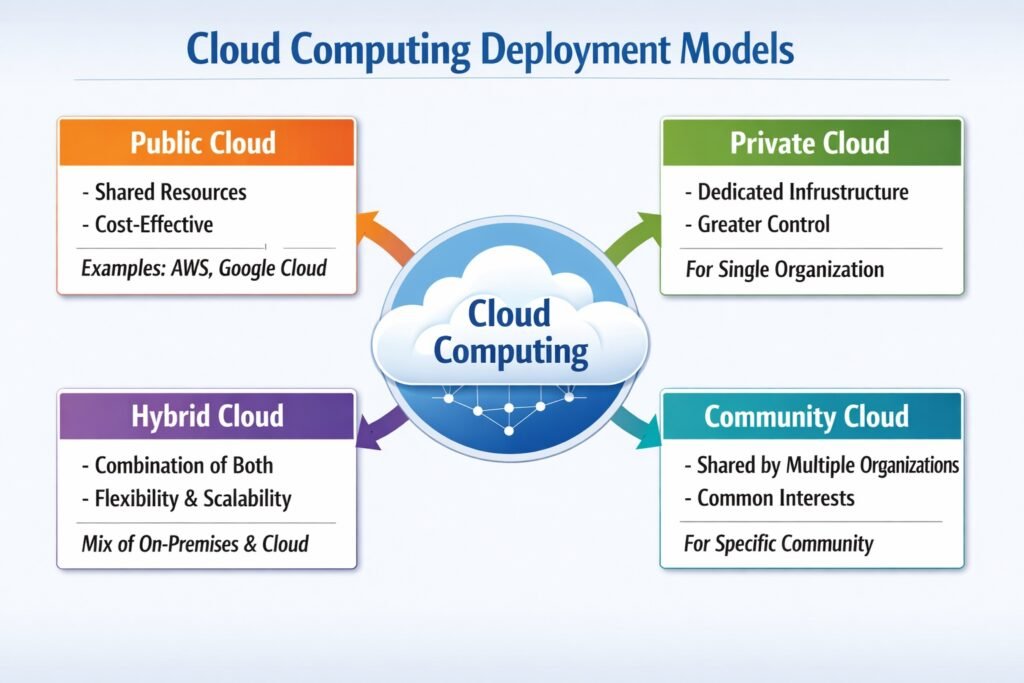
Cloud Computing Deployment Models:
1. Public Cloud
Public cloud computing involves services delivered over the public internet by third-party providers (Amazon Web Services, Microsoft Azure, Google Cloud Platform) who own and manage all infrastructure, software, and data centers. Multiple organizations (tenants) share the same physical hardware, isolated logically through virtualization. For MIS and DSS, public cloud offers rapid deployment of analytics platforms, infinite scalability for fluctuating workloads, and pay-per-use pricing that converts capital expenses to operational expenses. Organizations access dashboards, data warehouses, and decision models from anywhere without managing underlying infrastructure. However, public cloud shares security responsibility—the provider secures the cloud, while customers secure their data within it. Public cloud suits small-to-medium enterprises, organizations with variable demand, or those lacking in-house data center expertise. Compliance restrictions may limit public cloud use for highly regulated industries.
2. Private Cloud
Private cloud computing dedicates cloud infrastructure exclusively to a single organization, hosted either on-premises (internal private cloud) or by a third-party provider in a dedicated environment (externally hosted private cloud). The organization retains full control over hardware, networking, security policies, and data governance. For MIS and DSS handling sensitive financial data, trade secrets, or regulated information (healthcare, defense), private cloud meets compliance requirements that public cloud cannot satisfy. Performance is predictable because no noisy neighbors consume shared resources. Organizations customize the stack entirely—hypervisors, operating systems, database engines, analytics tools. However, private cloud sacrifices public cloud’s elasticity (scaling requires purchasing hardware) and shifts capital and maintenance costs back to the organization. Private cloud suits large enterprises with dedicated IT staff, strict regulatory mandates, or workloads requiring deterministic performance for mission-critical decision support.
3. Community Cloud
Community cloud computing provides shared infrastructure to a specific group of organizations with common concerns: regulatory compliance (HIPAA for healthcare providers), security requirements (financial industry standards), mission objectives (government agencies), or domain-specific data formats. Several organizations collectively build, manage, and operate the cloud, sharing costs while maintaining isolation from the general public. For MIS and DSS, community cloud enables benchmarking and collaborative analytics across peer organizations—hospitals comparing treatment outcomes, banks sharing fraud patterns, universities pooling research data—without exposing information to competitors or the public. Governance is shared through agreed policies, which requires coordination overhead and trust among members. Costs are lower than private cloud but higher than public cloud due to customization. Community cloud suits consortia, industry associations, government partnerships, or supply chain collaboratives requiring shared decision-support infrastructure.
4. Hybrid Cloud
Hybrid cloud computing combines two or more deployment models (typically public and private) bound together by technology that enables data and application portability. Organizations run sensitive workloads and core MIS on private cloud while using public cloud for burst capacity, disaster recovery, development/testing, or non-critical DSS analytics. For decision support, hybrid architecture allows “surge computing”—running complex what-if simulations or machine learning training on public cloud’s elastic resources while keeping operational reporting and customer data on private cloud. Data encrypted during transfer moves seamlessly between environments. Hybrid cloud offers the best of both models: private cloud’s control and compliance plus public cloud’s scalability and cost efficiency. However, integration complexity, network bandwidth requirements, consistent security policies across environments, and data synchronization latency present significant challenges. Hybrid cloud suits large enterprises with variable analytical workloads and strict data governance requirements.
Benefits of Cloud Computing:
1. Cost Reduction
Cloud computing eliminates upfront capital expenditure on servers, storage, and networking hardware. Organizations pay an operational expense model (subscription or pay-per-use), converting fixed costs into variable costs. This is critical for MIS/DSS because it removes financial barriers to advanced analytics. No need to over-provision for peak demand or underutilize expensive infrastructure. Electricity, cooling, maintenance, and IT staff costs shift to the cloud provider. Small and medium enterprises access enterprise-class decision support without massive investment. The pay-as-you-go model ensures that MIS budgets align directly with actual usage, improving financial predictability and return on investment.
2. Scalability and Elasticity
Cloud resources scale instantly up or down based on demand without manual intervention. For MIS and DSS, this means handling peak-period transaction volumes (month-end closing, holiday sales) without performance degradation. Elasticity automatically adds processing power for complex what-if simulations or data-intensive analytics, then releases it when the task completes. Traditional on-premise systems require purchasing for peak load, wasting capacity during normal operations. Cloud scalability ensures decision-makers always have responsive systems regardless of query complexity or concurrent users. Vertical scaling (more powerful servers) and horizontal scaling (more servers) occur seamlessly through configuration changes or auto-scaling policies.
3. Anywhere, Anytime Access
Cloud-based MIS and DSS are accessible from any internet-connected device—laptop, tablet, smartphone—regardless of geographic location. Executives review dashboards during travel, field managers enter sales data from customer sites, and distributed teams collaborate on shared analytics. This supports modern work patterns: remote work, global operations, and multi-site organizations. No virtual private network (VPN) required for basic access, though security options exist for sensitive data. Decision-makers are no longer tethered to office desktops or internal networks. Real-time data availability means decisions use current information, not last night’s downloaded report. Business continuity improves as access continues during office closures or disruptions.
4. Automatic Updates and Maintenance
Cloud providers manage all infrastructure maintenance—security patches, operating system updates, hardware replacements, and software version upgrades—without disrupting users. MIS and DSS platforms receive continuous improvements, new analytical features, and security fixes automatically. Organizations eliminate scheduled downtime for system maintenance and avoid running outdated, vulnerable software. The provider ensures compatibility between components, reducing IT team workload. Decision-makers always use the current version with latest capabilities. For regulated industries, providers maintain compliance certifications (SOC, ISO, GDPR), reducing organizational audit burdens. Automatic updates prevent the common problem of legacy systems diverging from vendor-supported versions over time.
5. Disaster Recovery and Business Continuity
Cloud providers replicate data across geographically redundant data centers, ensuring MIS and DSS remain available during localized failures—power outages, natural disasters, hardware faults, or cyberattacks. Automated backups with point-in-time recovery allow restoration of lost or corrupted data within minutes, not days. Recovery Time Objectives (RTO) and Recovery Point Objectives (RPO) as low as seconds are commercially available. Organizations avoid building expensive secondary data centers. For decision support, continuity means executives never lose analytical capabilities during crises. Regular automated testing of recovery procedures validates effectiveness without manual effort. Cloud-based disaster recovery is more reliable, faster to implement, and significantly cheaper than traditional approaches.
6. Enhanced Security
Leading cloud providers invest billions in security: encrypted data at rest and in transit, hardware security modules, distributed denial-of-service (DDoS) protection, continuous monitoring, and compliance certifications. Most organizations cannot match this security expertise or investment on-premise. For MIS/DSS containing sensitive financial, customer, or strategic data, cloud security reduces breach risk. Identity and access management (IAM) integrates with existing directories, providing granular control over which users access which reports or models. Audit logs track every access and modification. Cloud providers maintain physical security, network intrusion prevention, and vulnerability scanning continuously. Shared responsibility models clarify provider versus customer security obligations.
7. Faster Innovation and Deployment
Cloud platforms offer ready-to-use services: data warehouses, machine learning models, real-time analytics, and visualization tools that would take months to build on-premise. MIS and DSS projects launch in days or weeks instead of quarters. Development and testing environments spin up instantly, enabling rapid prototyping of decision support features. If a model or dashboard proves ineffective, teams discard it without sunk infrastructure costs. Providers continuously add new capabilities (AI services, geospatial analytics, streaming data processing), making them available immediately. This accelerates the cycle from identifying a decision support need to delivering a working solution. Organizations experiment more, fail faster at lower cost, and ultimately build better decision systems.
Challenges of Cloud Computing:
1. Data Security and Privacy Risks
Storing sensitive organizational data on third-party infrastructure introduces security concerns despite cloud providers’ investments in protection. Risks include unauthorized access by cloud employees, other tenants (in multi-tenant environments), or external attackers targeting the provider. Data traversing the internet during upload/download may be intercepted without proper encryption. For MIS/DSS handling financial records, customer personal data, trade secrets, or strategic plans, security breaches could cause regulatory fines, reputational damage, and competitive disadvantage. Organizations must trust provider security controls or implement additional encryption, which complicates analytics (encrypted data is harder to query). Compliance with data protection laws (GDPR, HIPAA, etc.) adds complexity when data crosses jurisdictions.
2. Downtime and Service Availability
No cloud provider guarantees 100% uptime; even major providers experience outages. Service Level Agreements (SLAs) typically offer 99.9% to 99.99% availability, translating to 8.76 hours to 52 minutes of annual downtime. When cloud services fail, organizations lose access to MIS dashboards, DSS analytical models, transaction processing, and real-time reporting. Decision-makers cannot retrieve critical information during outages, potentially halting operations. Dependency on internet connectivity means local network failures also disable access. While providers compensate with service credits for downtime, business impact often exceeds credits. Organizations must plan for offline fallback procedures, cache critical data locally, or deploy multi-cloud redundancy—each adding cost and complexity.
3. Vendor Lock-In
Migrating to one cloud provider’s platform creates dependency on proprietary APIs, data formats, workflow tools, and authentication mechanisms. Switching providers later requires significant re-engineering, data migration, application rewriting, and staff retraining—costly and time-consuming. Even data export faces hurdles: volume limits, bandwidth constraints, and format incompatibilities. For MIS and DSS built on provider-specific analytics services (e.g., machine learning pipelines, serverless functions, managed databases), leaving that vendor means rebuilding entire systems from scratch. Multi-cloud strategies reduce lock-in but increase management complexity and cross-cloud networking costs. Organizations should prefer open standards, containerization (Docker/Kubernetes), and portable data formats to mitigate lock-in risks before committing to a cloud platform.
4. Limited Control and Visibility
Cloud users operate within provider-determined infrastructure boundaries, losing fine-grained control over hardware, hypervisors, network routing, and physical security. Performance fluctuations from “noisy neighbors” (other tenants consuming shared resources) affect MIS response times unpredictably. Debugging performance issues becomes harder because underlying infrastructure details are opaque. Network latency varies based on provider routing decisions beyond customer control. For DSS requiring deterministic response times (real-time decision support), this unpredictability is problematic. Audit and compliance become challenging when logs and system configurations are inaccessible or partially exposed. Organizations accustomed to on-premise full stack control find cloud’s black-box nature uncomfortable, particularly for mission-critical or regulated decision systems.
5. Data Transfer and Bandwidth Costs
Moving large volumes of data into and out of the cloud incurs significant costs. Uploading historical data for data warehousing (e.g., years of sales transactions, sensor logs) consumes bandwidth and time; providers charge for data ingress beyond thresholds. Egress fees—downloading data from cloud to on-premise or another cloud—are particularly expensive and often surprise organizations. For MIS generating frequent large reports or DSS exporting simulation results, egress costs accumulate rapidly. Transferring terabytes for backup restoration or disaster recovery testing becomes prohibitively costly. Organizations may resort to physical data shipping appliances (AWS Snowball, Azure Data Box) for initial uploads, but ongoing sync costs remain. Data gravity the tendency to stay within one cloud to avoid egress fees—reinforces vendor lock-in.
6. Compliance and Legal Issues
Storing data in cloud servers located in different countries or regions subjects organizations to multiple legal jurisdictions, conflicting data protection laws, and varying regulatory requirements. The European Union’s GDPR restricts personal data transfer outside EU; US-based cloud providers may be compelled by Patriot Act or CLOUD Act to disclose data regardless of storage location. Healthcare (HIPAA), financial (SOX, PCI-DSS), and government (FedRAMP) regulations impose specific controls, audit trails, and breach notification rules that not all cloud services support equally. Organizations must verify provider compliance certifications, map data flows across regions, negotiate Business Associate Agreements (BAA), and maintain audit readiness. Violations carry heavy fines. Legal due diligence becomes substantially more complex than on-premise deployments.
7. Internet Dependency and Latency
Cloud computing requires reliable, high-bandwidth internet connectivity. Organizations in rural areas, developing regions, or locations with poor infrastructure suffer degraded performance or complete inaccessibility. For MIS/DSS supporting real-time decision-making (point-of-sale systems, stock trading, emergency response), even milliseconds of network latency impact effectiveness. Latency-sensitive applications like interactive what-if simulations or real-time dashboards frustrate users when each click waits for cloud round-trip. Bandwidth constraints limit concurrent users and report generation speed. Network outages (ISP failure, fiber cuts, DNS problems) disable cloud access entirely. While offline-capable designs exist, they add synchronization complexity. Organizations cannot control internet quality; they must accept performance variability or maintain expensive redundant connections.
8. Hidden and Unpredictable Costs
Cloud’s pay-per-use model, while flexible, creates unpredictable expenses that exceed traditional on-premise fixed costs if not carefully managed. Data egress, API calls beyond free tiers, storage access frequency (cold vs. hot tiers), cross-region replication, support plans, and managed service premiums accumulate invisibly. A DSS running complex queries hourly may incur database read charges far exceeding expectations. Developer mistakes (leaving test instances running, logging excessively) balloon bills. “Zombie” resources—forgotten storage volumes, unused load balancers, unattached IP addresses—continue charging indefinitely. Budgeting becomes difficult when usage varies. Unlike on-premise capital expenses that depreciate predictably, cloud operational expenses require continuous monitoring, tagging strategies, automated shutdown policies, and financial governance. Without diligent cost management, cloud can become more expensive than on-premise alternatives.
